
Value opinion
“Prepare a value opinion for a 400 m² lot in downtown Chapecó, SC.”
Comparables near the property, you choose, factor adjustment and a PDF opinion.
PTAM for brokers and appraisal reports for engineers and architects: chat with the assistant or use the screens at each step. Market research, factor adjustment and regression, with professional review and responsibility. Start with 200 free credits for appraisal operations, including those requested through the assistant. Conversational use does not spend credits and is subject to plan limits.
Illustrative values. Not a real appraisal.
The problem
Hours scraping listings, copying data into spreadsheets and cleaning duplicates by hand.
Regression models in legacy tools locked to a single computer, with no collaboration or history.
Grounding and precision degrees checked by hand — easy to miss an item and compromise the report.
Assembling calculations, tables, charts and appendices by hand, from scratch, every time.
Valora assistant
The assistant runs the entire value opinion inside Valora: it creates the appraisal, researches the market, calculates and generates the document. On full appraisal reports, it works with you at every step. Everything it does shows up on the screens, and you can take over at any point.
Chat and screens work on the same appraisal: start in one and continue in the other.
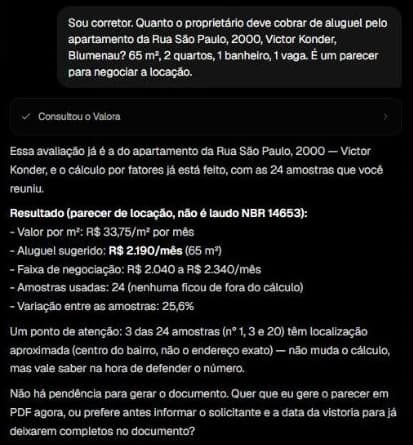
The broker asks for the apartment's rent and gets the value, the negotiation range and a note about the comparables.
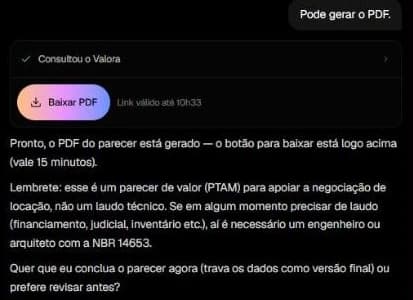
One more request and the value opinion is ready to download.
Start with 200 free credits for appraisal operations, including those requested through the assistant. Conversational use does not spend credits and is subject to plan limits.
Real chat in the Valora assistant, October 2026. Example property, appraised with real listings.
How it works
Enter the region and property type. Valora collects listings, cleans, deduplicates and enriches samples with IBGE income and location — no spreadsheet.
Multiple linear regression with assisted variable selection, transformations, diagnostics and automatic degree classification per NBR 14653-2. The appraiser decides; AI prepares the way.
Calculation memorials, charts, maps and appendices generated automatically, with grounding and precision degrees — editable, for review by the responsible professional.
Use it from your AI
Connect Valora to Claude, ChatGPT or Perplexity. You ask in the chat; Valora searches, calculates, produces the document and keeps everything organized.
Works with
 ClaudeOne-click connector and a plugin with ready-made workflows
 ChatGPTConnector using the Valora address
 PerplexityConnector using the Valora address
“Prepare a value opinion for a 400 m² lot in downtown Chapecó, SC.”
Comparables near the property, you choose, factor adjustment and a PDF opinion.
“Build the report for this apartment with the samples I already have and simulate the regression.”
Variables, regression, grounding and precision degrees and a Word report.
“Find 150 to 250 m² houses near this address and save the ones I pick.”
Portal listings sorted by distance, saved to your sample bank.
Using Claude?
Install the Valora plugin in Customize → Plugins → Add marketplace: VCalazans/archicode-skills
Inside Valora, the Ready-made prompts screen has 14 workflows covering every feature, from value opinion to report.
The AI always states the cost and asks for your confirmation before spending credits or saving data. A broker PTAM does not replace an engineer or architect appraisal report when one is required. Check the requirements of the purpose and recipient.
Inside the product
No mockups: these are Valora screens running on public property listings from Santa Catarina, Brazil.
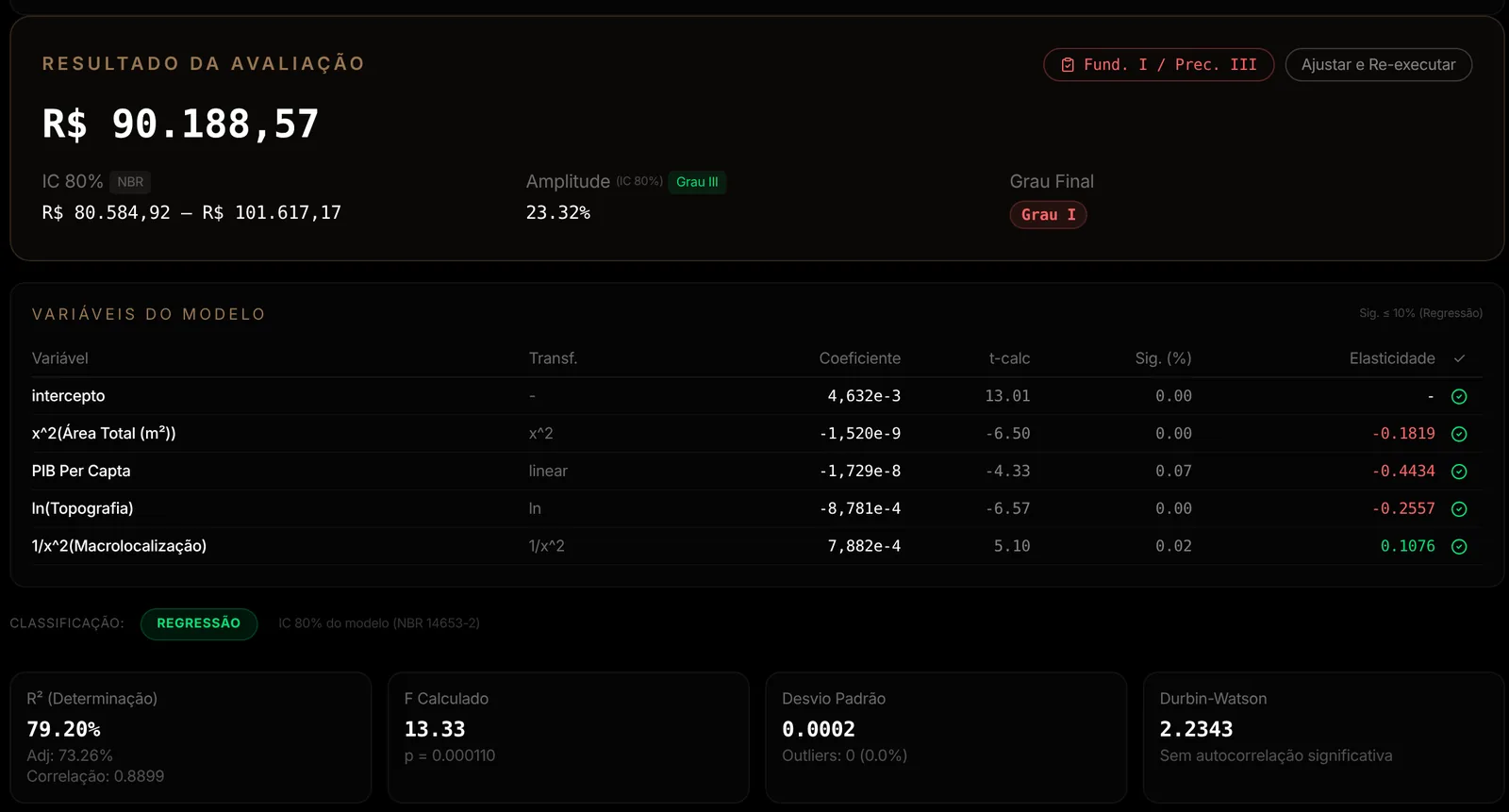
Estimated value, 80% confidence interval, amplitude and grounding/precision degrees — plus the model's variables, coefficients, significance and elasticity.
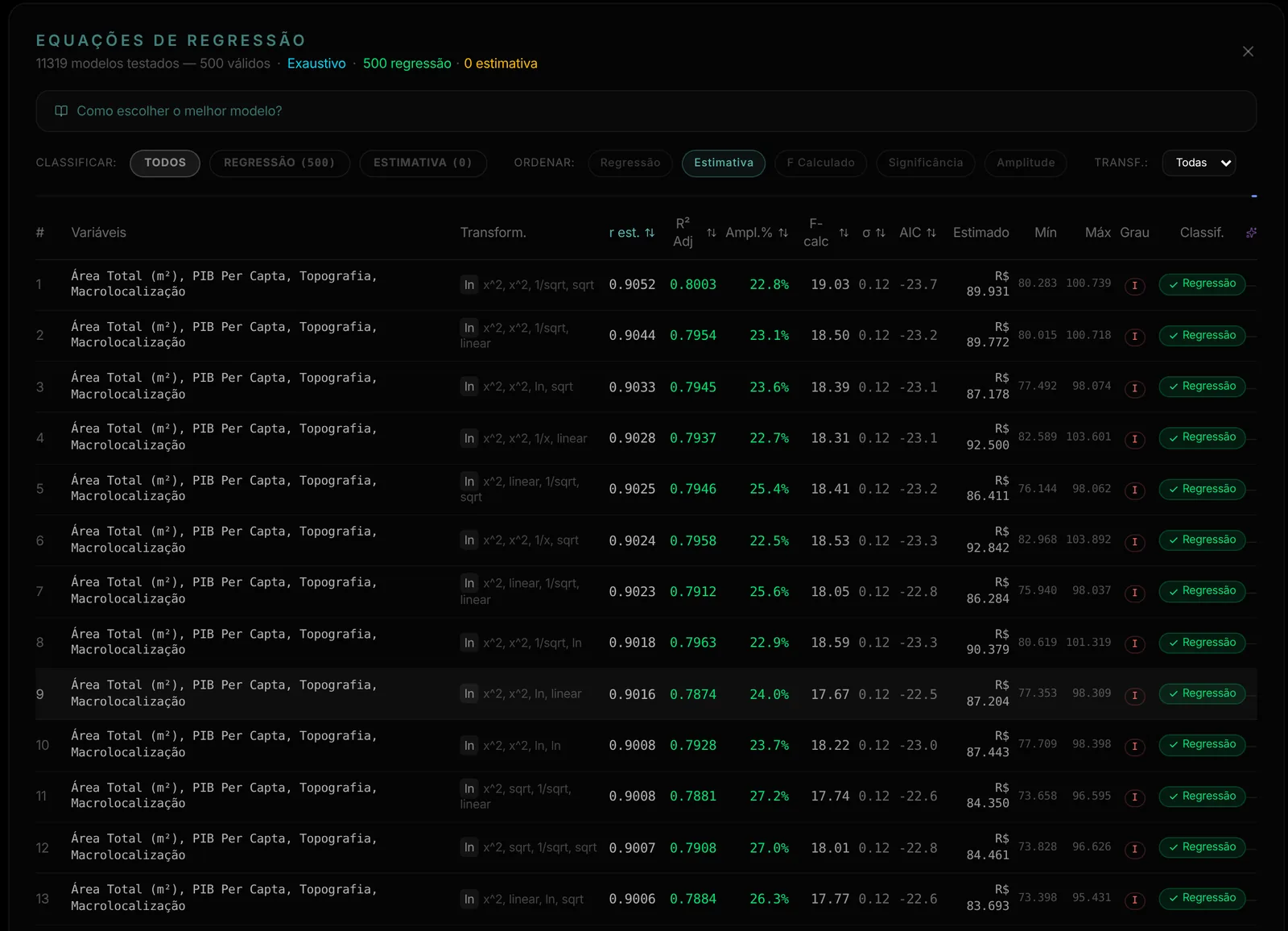
Thousands of variable and transformation combinations tested in seconds and ranked by estimation correlation. You compare and choose.
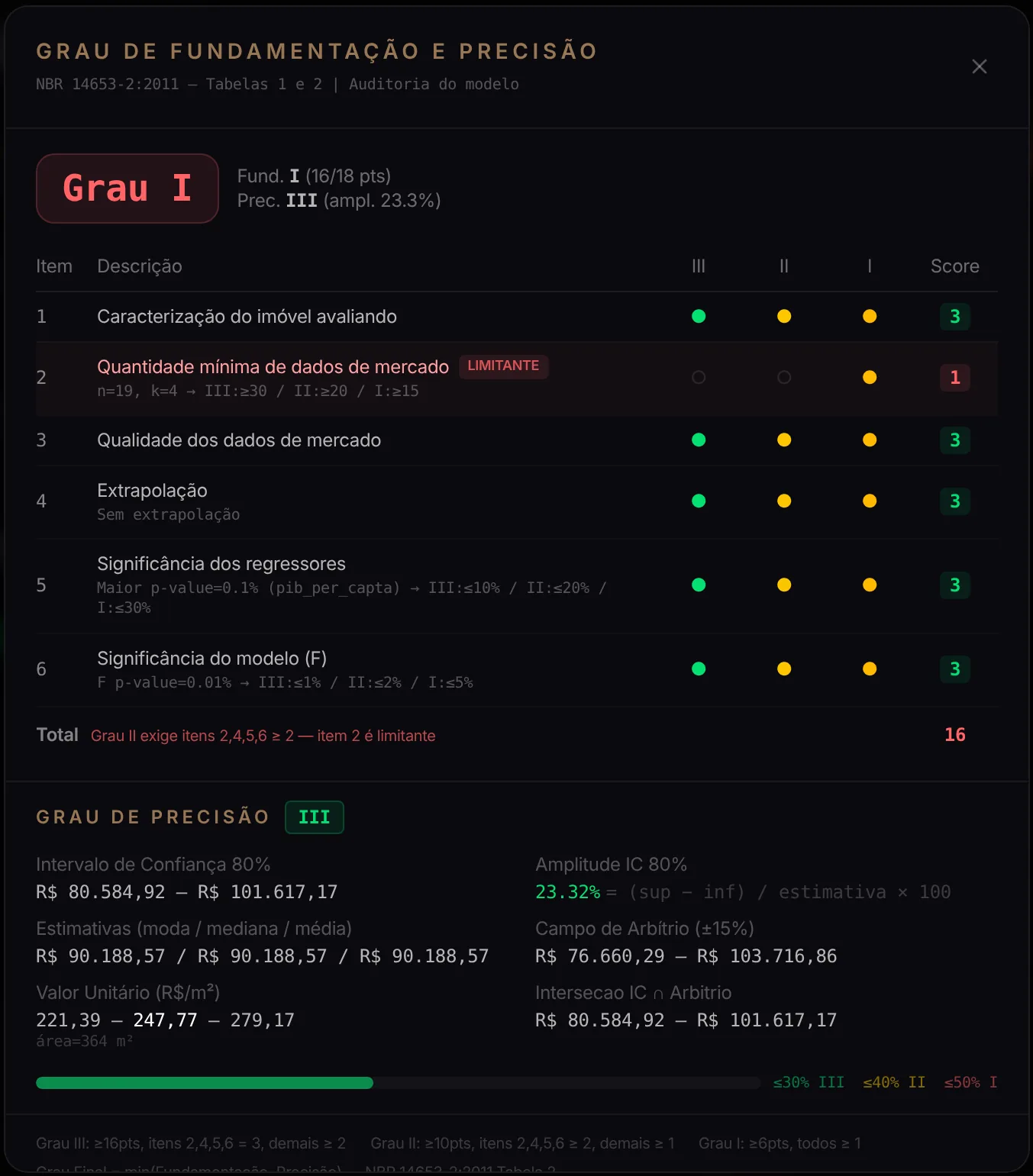
Every item of Tables 1 and 2 with its score, the reason and the item that capped the degree. Classification stops being a black box.
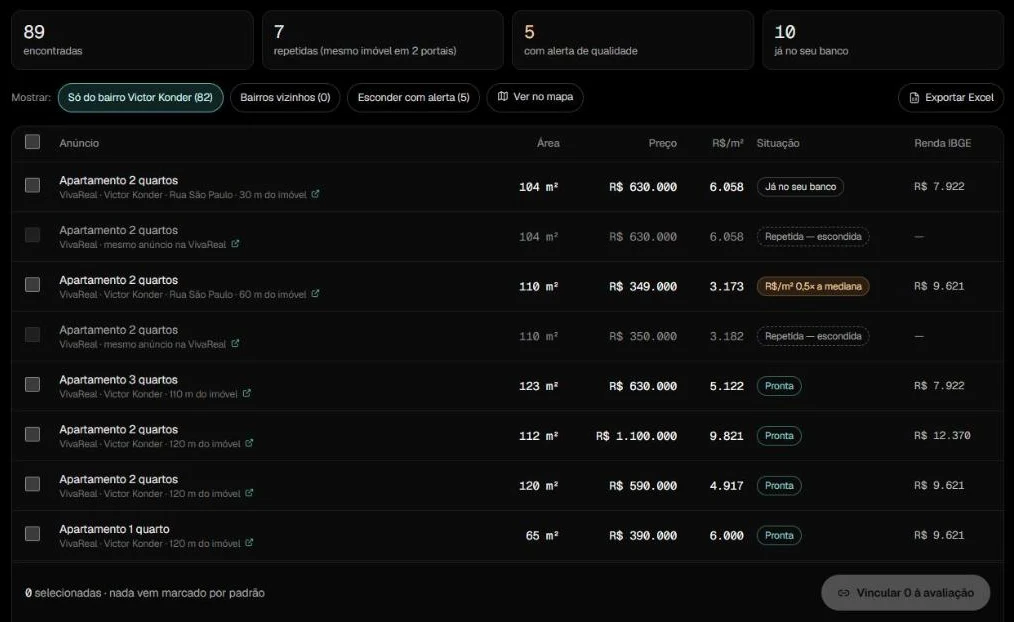
Listings from the neighborhood come first and the rest of the city fills in when comparables are scarce, ordered from nearest to farthest from the property. Cross-portal duplicates are hidden, outliers are flagged and nothing is preselected.
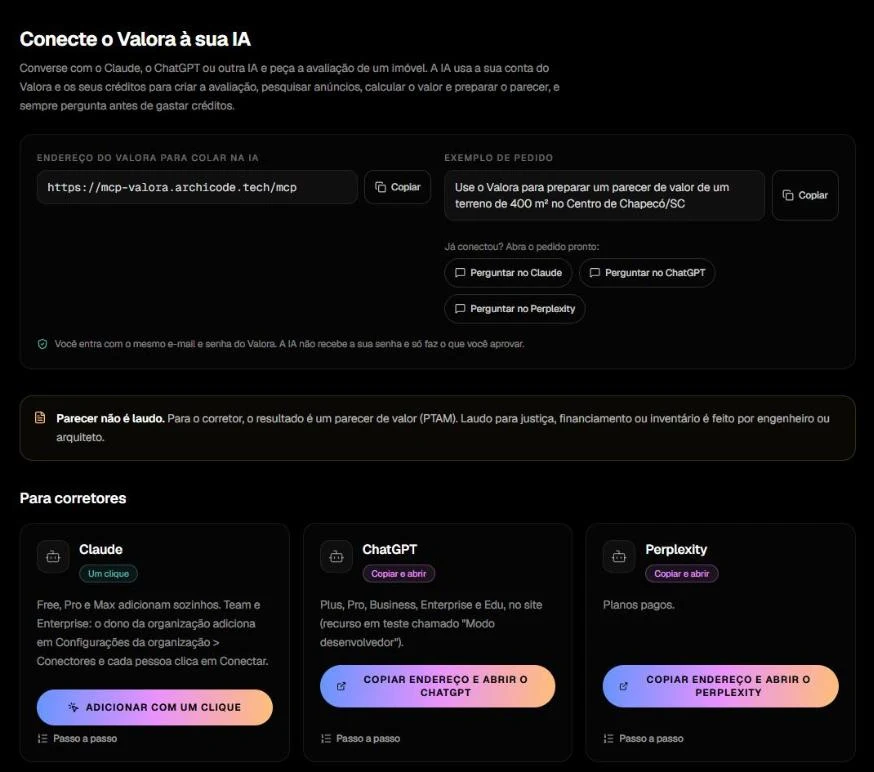
Connect Valora to your AI and ask, for example, for a value opinion on a lot. It uses your account and credits to create the appraisal, search, calculate and prepare the document, and asks before spending credits or saving data.
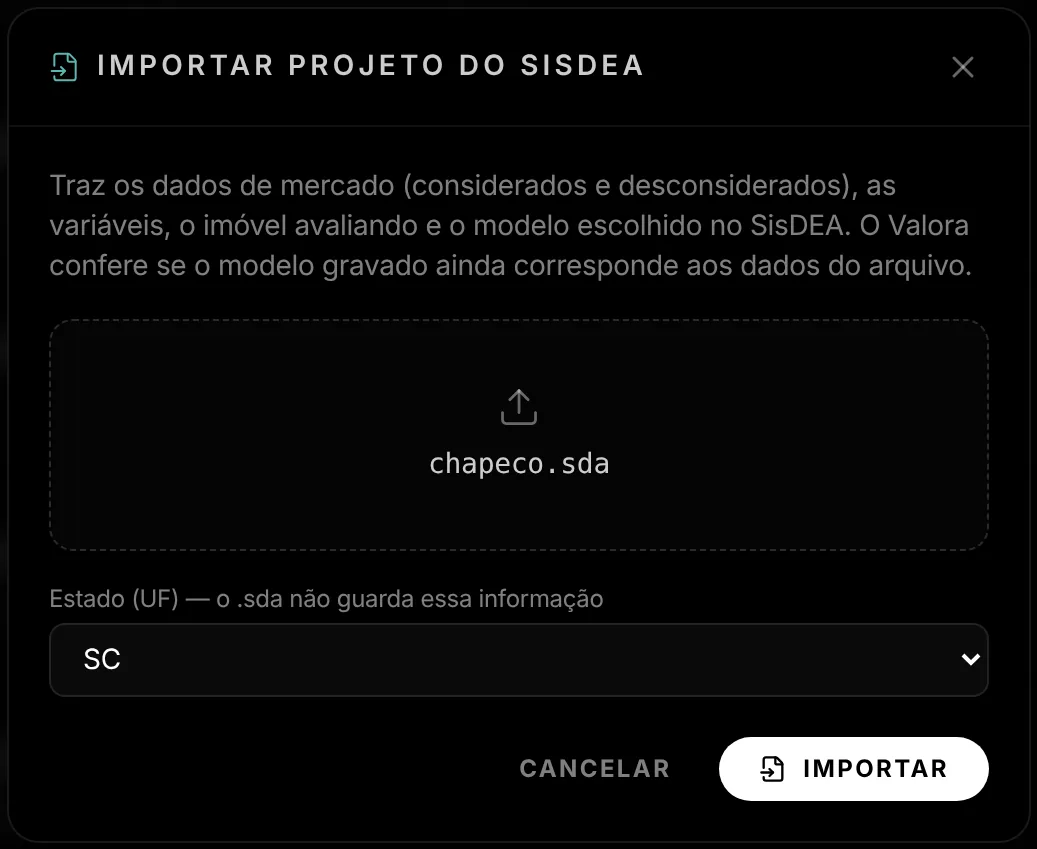
Import the project from the appraisal software you already use, with market data, variables, subject property and the chosen model. Valora checks whether the saved model still matches the data.
Product captures from October 2026. Public listing data; demo project.
Valuation engineering + AI
Continuous ingestion of listings and transactions by region. Automatic cleaning, dedup and enrichment. Samples ready by neighborhood, type and area range.
Guided selection of explanatory variables, multiple-regression fitting and assumption checks. The appraiser decides — AI paves the way.
PDF and Word with fields, calculation memos and appendices. Classification and suitability depend on the data and review by the responsible engineer or architect.
For real-estate brokers
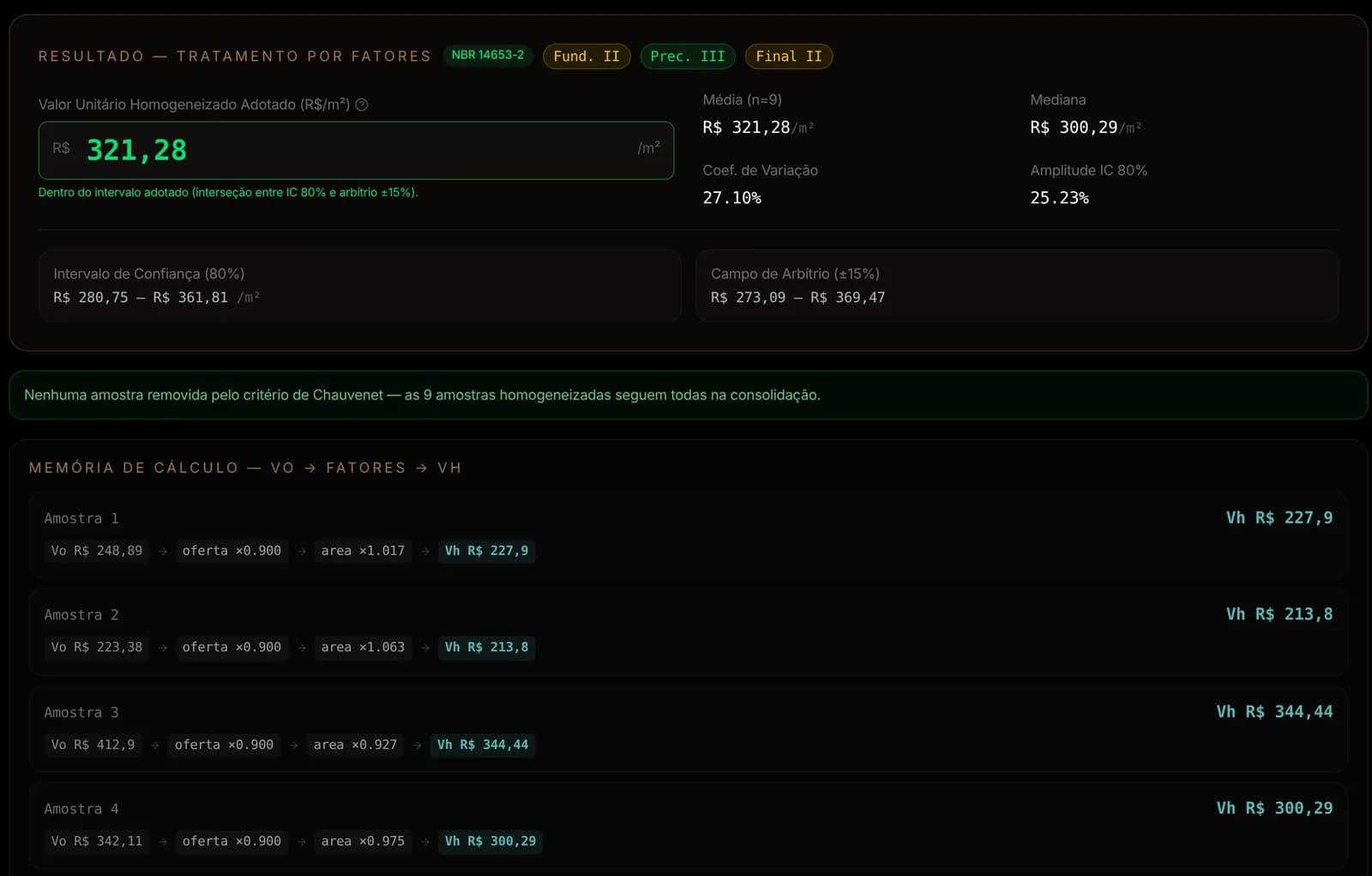
Not every deal needs regression. With 3 to 20 comparable listings, Valora adjusts each one by factors (offer, area, condition, topography and more), removes outliers and delivers a price range to guide sellers and buyers.
Computed in Valora from public listings. Values illustrate the method; this is not an appraisal of the property.
PTAM (Parecer Técnico de Avaliação Mercadológica, a technical market valuation opinion) is the broker document, with CRECI identification and a CNAI field. It is distinct from the engineer or architect appraisal report. The professional must check credentials, data and suitability for the purpose and recipient; acceptance is not guaranteed.
Free tools
Three utilities running on the same technical base as the product. Use them, validate, and see how Valora automates the rest.
IBGE · census tract
Enter a ZIP (CEP) or address and see the average and median income of the IBGE census tract — the same socioeconomic variable Valora uses to enrich samples.
Open toolNBR 14653-2 · regression
Find the degree (I, II or III) your regression model reaches and how many market data points each degree requires. Based on Table 1 of the standard.
Open toolevolutionary method
Compute the depreciation coefficient of improvements from age, useful life and conservation state. Same formula as Valora's evolutionary method.
Open toolComparison
A modern, cloud-based alternative to desktop appraisal software and spreadsheets.
| Traditional tools | Valora | |
|---|---|---|
| Market research | Manual, listing by listing | Automated, with cleaning and dedup |
| Socioeconomic data (income) | Separate, manual lookup | Automatic IBGE enrichment by census tract |
| Grounding/precision degree | Manual checking | Auto-classified (NBR 14653-2) |
| Access | Locked to one computer | Cloud, from anywhere |
| Report generation | Manual layout in Word | Automatic, editable PDF and Word |
| Artificial intelligence | None | Assistant that runs value opinions and supports reports; reads photos and deeds |
FAQ
Yes. It's a modern, cloud-based platform unifying market research, statistical modeling and report generation — without a desktop tool locked to one computer. You keep full control of technical decisions.
The engine supports grounding and precision classification using NBR 14653-2 tables and generates PDF/Word with calculations, charts and appendices. Report compliance depends on the data, checks and review by the responsible engineer or architect. Software does not guarantee automatic compliance or acceptance.
No. AI speeds up repetitive steps (collection, variable suggestion, model interpretation, fill-in), but all technical decisions and responsibility remain with the qualified professional.
Direct market comparison by regression or by factor adjustment, cost approach (Ross-Heidecke), residual (involutive) and income capitalization — covering the main NBR 14653 methods.
Yes. Factor adjustment produces PTAM (Parecer Técnico de Avaliação Mercadológica), with CRECI identification and a CNAI field. Brokers must check their data and credentials for the purpose. PTAM does not replace an engineer or architect appraisal report when the recipient requires one.
No. The assistant produces the entire value opinion in the chat: it confirms the data, researches listings, calculates and generates the PDF, always asking for your OK before using credits. The screens remain available if you want to check or adjust each step, on the same appraisal.
Yes. From photos of the property and comparables, it suggests condition (Ross-Heidecke), construction standard (CUB) and apparent age. From the uploaded deed, it extracts registry, owner, areas and boundaries. Nothing is saved without your confirmation.
Yes. Valora imports the project with market data, variables, subject property and the chosen model, and warns when the saved model no longer matches the file's data.
Yes. The Connect to your AI screen shows the address to paste into Claude, ChatGPT or Perplexity. You sign in with your Valora email and password, and the AI works in your account: it creates the appraisal, searches listings, calculates and prepares the value opinion, always asking before spending credits.
No. Valora runs in the browser. You can start by trying the free tools — like IBGE income lookup and the grounding-degree calculator — with no install.
Create your Valora account or talk to our team to see how it fits your appraisal workflow. Start with 200 free credits for appraisal operations, including those requested through the assistant. Conversational use does not spend credits and is subject to plan limits.